SMS Terms
Program: SummerBoss Account Notifications
Last updated: May 27, 2026
What this program is
SummerBoss sends transactional SMS notifications to SummerBoss account holders who have explicitly opted in. Messages cover account-related events tied to the camps and registrations on your account: enrollment confirmations, payment receipts, registration deadline reminders, waitlist updates, and camp schedule notifications. We do not send marketing or promotional SMS through this program.
Disclosure
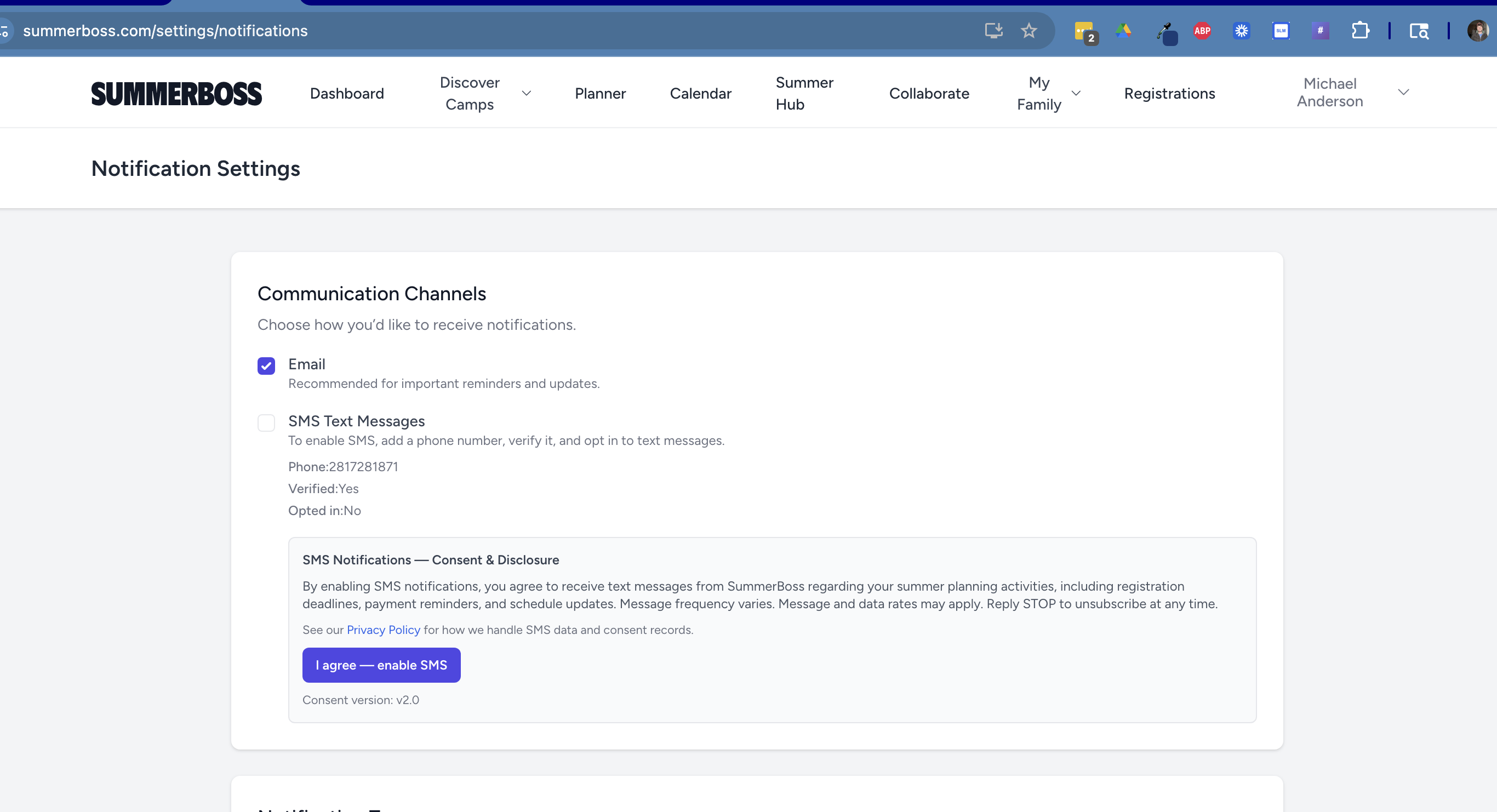
The text above is the exact wording shown to every user immediately above the opt-in button inside SummerBoss. A SHA-256 hash of this string is stored alongside each opt-in event so we can prove the wording each user agreed to.
Consent screen (screenshot)
Below is a screenshot of the consent screen exactly as it appears to a SummerBoss user inside /settings/notifications at the moment of opt-in. The same disclosure paragraph above is shown verbatim, followed by the green "I agree — enable SMS" button that records the affirmative opt-in.
Message frequency
Frequency varies based on your account activity and the camps on your planner. There is no fixed cadence. Most accounts receive between 0 and 10 messages per month. Msg & data rates may apply.
How users opt in
No phone number is collected at SummerBoss account signup. After signing in to a SummerBoss account, users opt in to SMS at summerboss.com/settings/notifications (also reachable as summerboss.com/settings).
- The user enters their mobile number. The disclosure above is shown directly below the input, before any SMS is sent.
- The user clicks Send verification code. A one-time code is sent via Twilio Verify (a separate Twilio product, not this Programmable Messaging campaign).
- The user enters the code to prove ownership of the number.
- The user clicks "I agree — enable SMS" beneath the same disclosure repeated on the post-verification panel. This click is the affirmative opt-in.
Each opt-in event is logged with timestamp, IP address, user-agent, consent-version identifier, and a SHA-256 hash of the disclosure copy shown to the user. Only verified, opted-in numbers receive notifications.
Keywords
Opt-in
START, SUBSCRIBE
Opt-out
STOP, STOPALL, UNSUBSCRIBE, CANCEL, END, QUIT, OPTOUT, REVOKE
Help
HELP, INFO
You can stop receiving SMS at any time by replying any opt-out keyword to a SummerBoss message, or by clicking Disable SMS at summerboss.com/settings/notifications. Reply HELP for help.
Privacy & terms
- Privacy Policy — SMS Communications (TCPA) section — names Twilio Inc. as the SMS processor, covers retention of consent evidence, no-sharing-for-marketing, and TCPA disclosures.
- Terms of Service
Contact
Questions about SMS practices? Email legal@summerboss.com.